Module Status
Module status alerts users about events within your module. Use SetStatus to communicate warnings or informational messages without stopping the flow.
Available Status Levels
Unknown— Status unknown.Ok— Successful operation.Warning— Non‑critical issues that need attention; flow can continue.Error— Critical problems that prevent normal operation; may require handling or escalation and stops the flow if halt on error is enabled.Fatal— Severe failures that require immediate intervention and typically stop the flow.
Example
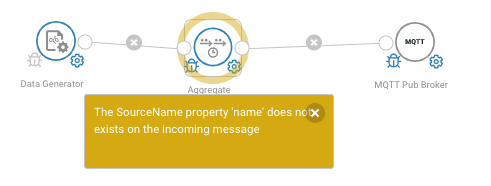
If your module expects a property that's missing, set a warning instead of failing:
if (!message.Has(this.Settings.SourceName))
{
    this.SetStatus(Status.Warning,
        $"Property '{this.Settings.SourceName}' not found on message");
    // Continue processing with default behavior
    return;
}
The status appears in Flow Studio:
Common Patterns
Missing Property
if (!message.Has("field"))
{
    this.SetStatus(Status.Information, "Incoming message missing 'field' property");
}
Partial Success
var processed = 0;
var failed = 0;

foreach (var item in items)
{
    if (ProcessItem(item))
        processed++;
    else
        failed++;
}

if (failed > 0)
{
    this.SetStatus(Status.Warning,
        $"Processed {processed}, failed {failed}");
}
Important Notes
Tip
Status Update Behavior:
SetStatusonly fires if the status changes from the current status- Use
SetStatus(status, message, force: true)to always fire the status - Clear status with
SetStatus(Status.OK)
Note
Status messages appear in Flow Studio and help users debug flows. Use clear, actionable messages.