Add Module Documentation
Modules should have documentation, a teaser, an icon, and a changelog. The documentation, teaser and changelog is written in markdown and the icon is a squared svg file.
Create a docs folder in the root of your project.
Documentation Files
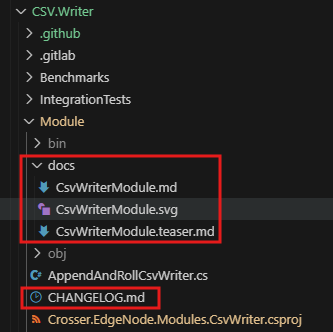
For our RandomNumberModule, we need to add three files to the docs folder named after the module class:
RandomNumberModule.md- Main documentationRandomNumberModule.teaser.md- Short description for hover tooltipRandomNumberModule.svg- Module icon.
Note
The filenames must match the module class name exactly (case sensitive).
File Descriptions
{classname}.md: Main documentation shown when you click a module in a flow{classname}.teaser.md: Teaser text shown when you hover over the module in the modules menu{classname}.svg: Icon representing the module in the UI (square format recommended)
Changelog
The changelog should be added in the same directory as the csproj file. Add a CHANGELOG.md file in the root of your project to document changes between versions. This helps users understand what's new, fixed, or changed in each release.
Project Layout Example
Tip
See our documentation example and changelog example for more inspiration, or view the documentation source and the changelog source.